Event Card Layout Size Guide
Professional event badge and event card design setup for Photoshop and CorelDRAW.
Learn proper event card dimensions, slot punching margin, bleed area and print-ready setup used for conferences, exhibitions and business events.
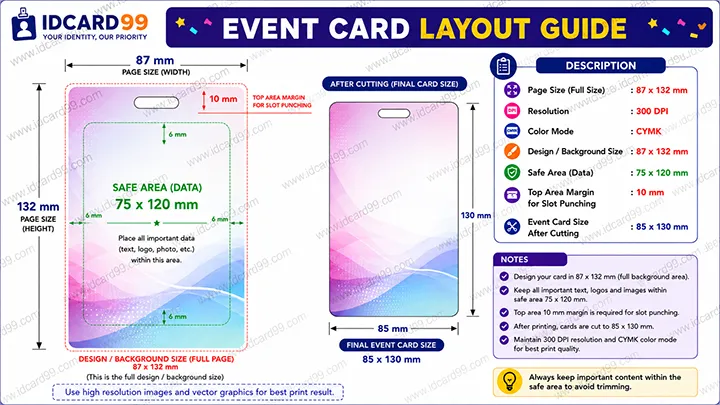
Event Card Design Setup
- Open file size: 1062 × 1535 px
- Final card size: 1016 × 1476 px
- Card size in MM: 85 × 130 MM
- Resolution: 300 DPI
- Design software: Photoshop & CorelDRAW
What is an Event Card Layout?
Event card layouts are used for conferences, exhibitions, seminars, trade shows, concerts and corporate events where attendee identification is required.
A professional event card design includes proper dimensions, slot punching safe margin, bleed area and high-quality print-ready setup for lanyard attachment.
Event cards are usually larger than standard PVC ID cards because they contain attendee information, sponsor branding, QR codes and event details visible from distance.
Event Card Design Process
Create New File
Start the event badge design using 1062 × 1535 px file size with 300 DPI RGB color setup.
Add Event Information
Include attendee name, company name, event logo, QR code, sponsor branding and category details.
Maintain Slot Punch Area
Keep important content away from the slot punching area used for attaching lanyards and badge holders.
Export Print-Ready Design
Export the final event card file in high resolution for professional printing and lamination.
Event Card Size Details
Open File Size
Complete design setup including bleed margin and cutting safety area.
- 1062 × 1535 px
- 90 × 130 MM
Final Event Card Size
Final printable event badge size after cutting and finishing process.
- 1016 × 1476 px
- 85 × 130 MM
Benefits of Proper Event Card Layout
Professional Look
Clean event badge design improves branding.
Better Visibility
Larger card size improves attendee visibility.
Safe Slot Punching
Proper margin prevents content damage.
High Print Quality
Professional setup improves final output.
Common Event Card Design Mistakes
- Ignoring slot punch safe area
- Using low-quality logos
- Keeping text too close to edges
- Incorrect bleed setup
- Wrong event card dimensions
- Low DPI export settings
- Poor QR code placement
- Overcrowded layout design
Best Software for Event Badge Design
Photoshop and CorelDRAW are widely used for professional event badge design because they support high-resolution export and advanced layout management.
These applications are useful for conferences, seminars, exhibitions, concerts and corporate event badge printing workflow.
Related Pages
Frequently Asked Questions
What is the standard event card size?
Event cards are generally created in larger vertical format such as 86 × 125 MM for better visibility.
Why is slot punching margin important?
Slot punching safe area prevents important text or logos from getting damaged during badge holder attachment.
Which DPI is best for event card printing?
300 DPI is recommended for high-quality event badge printing.
Which software is best for event badge design?
Photoshop and CorelDRAW are commonly used for professional event badge and conference card design.
Need Professional Event Card Printing?
We provide event badge printing, conference cards, visitor cards, PVC cards and custom lanyard solutions for exhibitions and corporate events.
Contact Us