Satin Lanyard Layout Size Guide
Professional 16mm & 20mm satin lanyard design setup for CorelDRAW and Photoshop.
Learn correct lanyard printing dimensions, logo repeat spacing, printable area and professional satin lanyard production workflow.
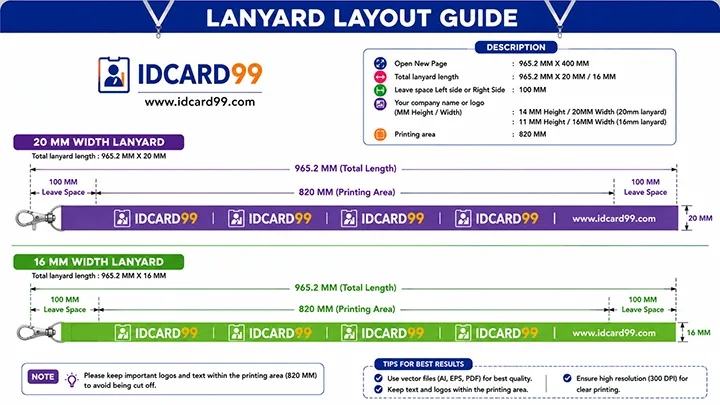
Satin Lanyard Design Setup
- Popular sizes: 16mm & 20mm
- Material: Satin lanyard
- Resolution: 300 DPI
- Repeat logo spacing setup
- Software: CorelDRAW & Photoshop
What is a Satin Lanyard Layout?
A satin lanyard layout is the professional design setup used for custom printed neck lanyards, office ID card straps, conference badge lanyards and promotional branding lanyards.
Satin material is commonly used because it provides smooth texture, premium finish and high-quality logo printing results. Proper lanyard layout setup is important for maintaining equal logo spacing and balanced repeat patterns.
Professional lanyard printing companies use high-resolution artwork, centered alignment and correct printable width for clean and premium quality satin lanyard production.
Important Lanyard Printing Tip
Always maintain proper logo repeat spacing and center alignment while creating satin lanyard layouts. Uneven spacing can create broken patterns and unprofessional print output after stitching and final production.
Satin Lanyard Design Process
Select Lanyard Width
Choose the required lanyard width based on office use, employee ID cards or event badge printing requirements.
Create Repeat Logo Layout
Arrange logos, text and branding elements in proper repeating sequence for continuous satin lanyard printing.
Maintain Center Alignment
Keep all logos and text centered properly to avoid uneven appearance after stitching and finishing process.
Export Print-Ready File
Export the final satin lanyard design in high-quality 300 DPI resolution for professional sublimation printing.
Best Satin Lanyard Sizes
16mm Satin Lanyard
16mm satin lanyard is best for company employees, schools, office staff and regular ID card use.
- Best for employee ID cards
- Lightweight and comfortable
- Professional office use
- Clean logo visibility
20mm Satin Lanyard
20mm satin lanyard is best for event cards, exhibitions, conferences and premium branding visibility.
- Best for event badges
- Better sponsor visibility
- Large printable area
- Premium branding appearance
Benefits of Satin Lanyards
Smooth Finish
Satin material provides soft and premium texture.
Better Printing
High-quality sublimation logo printing results.
Strong Branding
Repeated logos improve company visibility.
Comfortable Wear
Soft satin material feels comfortable on neck.
Common Lanyard Design Mistakes
- Uneven logo spacing
- Incorrect repeat alignment
- Low-resolution logo files
- Wrong printable width
- Poor center alignment
- Incorrect export settings
- Overcrowded layout design
- RGB and print color mismatch
Best Software for Satin Lanyard Design
CorelDRAW is widely used for vector-based satin lanyard design because it allows better control over repeat patterns, spacing and center alignment.
Photoshop is useful for preparing logos, branding artwork and high-quality image editing before final sublimation printing.
Related Pages
Frequently Asked Questions
Which satin lanyard size is best for employees?
16mm satin lanyard is commonly used for company employees, office staff and school ID cards.
Which lanyard size is best for event cards?
20mm satin lanyard is best for event badges, exhibitions and conference cards because it provides better branding visibility.
Why is satin material used for lanyards?
Satin material provides smooth texture, premium appearance and better sublimation printing quality.
Which software is best for lanyard layout creation?
CorelDRAW and Photoshop are commonly used for professional satin lanyard design and printing workflow.
Need Custom Satin Lanyard Printing?
We provide satin lanyard printing, PVC cards, event badges, RFID cards and professional branding solutions for schools, offices and businesses.
Contact Us