PVC ID Card Layout Size Guide
Professional PVC ID card design setup for Photoshop and CorelDRAW.
Learn correct PVC card dimensions, bleed area, safe zone and 300 DPI print-ready workflow used by professional ID card printing companies.
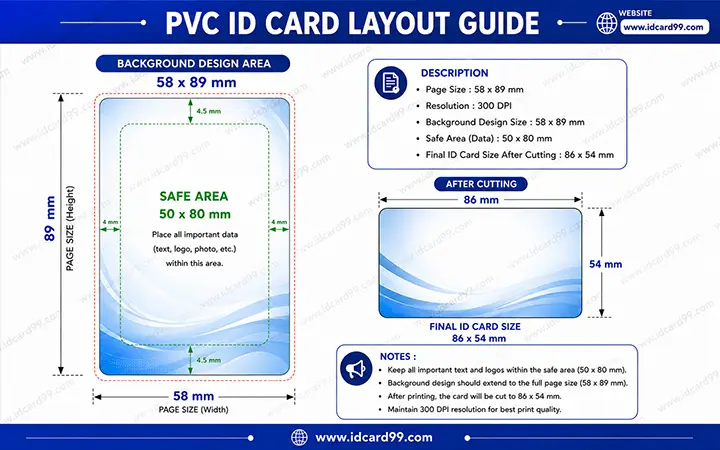
PVC Card Design Setup
- Open file size: 685 × 1051 px
- Final card size: 638 × 1016 px
- Card size in MM: 86 × 54 MM
- Resolution: 300 DPI
- Software: Photoshop & CorelDRAW
What is a PVC ID Card Layout?
A PVC ID card layout is the professional design setup used for creating print-ready employee cards, student cards, visitor cards and membership cards.
Proper layout setup is extremely important in PVC card printing because incorrect bleed area or wrong dimensions can cause text cutting, alignment problems and printing issues.
Professional designers use Photoshop and CorelDRAW to create PVC ID card files with correct bleed margin, safe text area and high-resolution export settings.
PVC ID Card Design Process
Create New File
Start by creating a new file using 685 × 1051 px size with 300 DPI RGB color mode in Photoshop or CorelDRAW.
Add Bleed Area
Extend background colors and design elements outside the final cut area to avoid white edges after PVC card cutting.
Maintain Safe Zone
Keep important text, logos and QR codes inside the safe area to prevent cutting during production.
Export Print-Ready File
Export the final design in high-quality print-ready format using proper resolution and color settings.
Understanding PVC Card Dimensions
Open File Size
The complete design file includes bleed area used for safe cutting and professional printing alignment.
- 685 × 1051 px
- 58 × 89 MM
Final Card Size
Final printable PVC card size after cutting and finishing process.
- 638 × 1016 px
- 86 × 54 MM
Benefits of Proper PVC Layout Design
Accurate Printing
Proper dimensions improve printing accuracy.
Safe Cutting
Bleed area prevents white borders after cutting.
Better Alignment
Text and photos stay properly aligned.
Professional Output
High-quality print-ready design workflow.
Common PVC Card Design Mistakes
- Designing without bleed area
- Using low DPI images
- Keeping text too close to card edges
- Exporting compressed low-quality files
- Wrong card dimensions
- Incorrect safe area usage
- Poor image quality
- RGB and CMYK mismatch problems
Best Software for PVC ID Card Design
Photoshop is widely used for image editing and high-quality photo management while CorelDRAW is commonly used for vector-based PVC ID card layouts and professional printing workflow.
Both applications are suitable for employee ID cards, student ID cards, visitor cards and membership card design creation.
Related Pages
Frequently Asked Questions
What is the standard PVC ID card size?
Standard PVC ID card size is generally 86 × 54 MM.
Why is bleed area important in PVC printing?
Bleed area helps avoid white borders after cutting and improves printing accuracy.
Which DPI is best for PVC card printing?
300 DPI is recommended for professional PVC ID card printing.
Which software is best for PVC card design?
Photoshop and CorelDRAW are commonly used for professional PVC ID card layout creation.
Need Professional PVC ID Card Printing?
We provide professional PVC card printing, RFID cards, NFC cards and custom ID card solutions for schools, offices and businesses.
Contact Us