Professional ID Card Layout Size Guides
Print-ready PVC card, event card, chemical ID card and lanyard layout size guides for CorelDRAW and Photoshop.
Learn correct card dimensions, bleed area, safe zone, 300 DPI setup and professional printing standards used by real ID card printing companies.
Why Correct Layout Size Matters
Many designers create ID card files without proper bleed area, safe margin or correct DPI settings. This causes printing mistakes, text cutting and alignment problems during PVC card production.
Our layout guides help you create professional print-ready files for ID card printing, event cards and lanyards using industry standard dimensions.
Design Software Supported
- CorelDRAW ID card design setup
- Photoshop PVC card layout design
- 300 DPI print-ready export settings
- Bleed area and safe zone guide
- Professional printing workflow
Explore Layout Guides
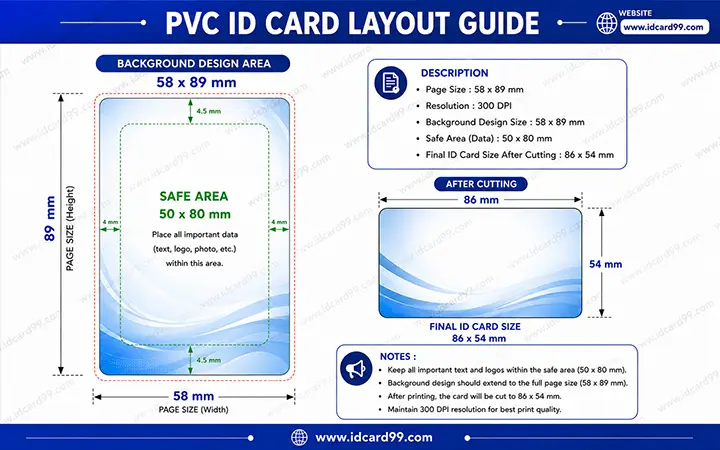
PVC ID Card Layout
Learn professional PVC ID card design dimensions including bleed area, safe printing zone, final card size and 300 DPI setup.
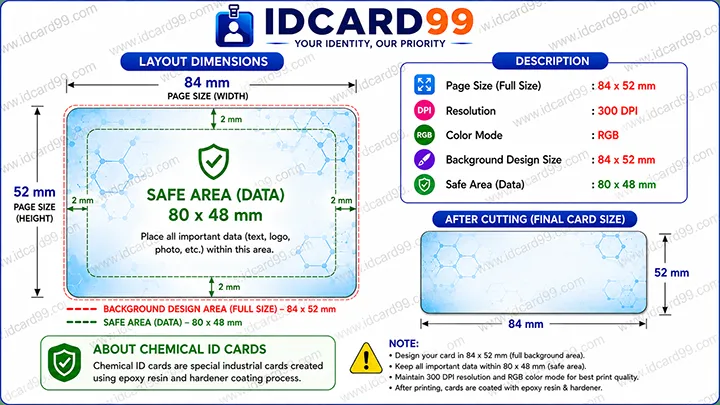
Chemical ID Card Layout
Professional chemical ID card layout guide for epoxy resin and hardener based ID cards with industrial print setup information.
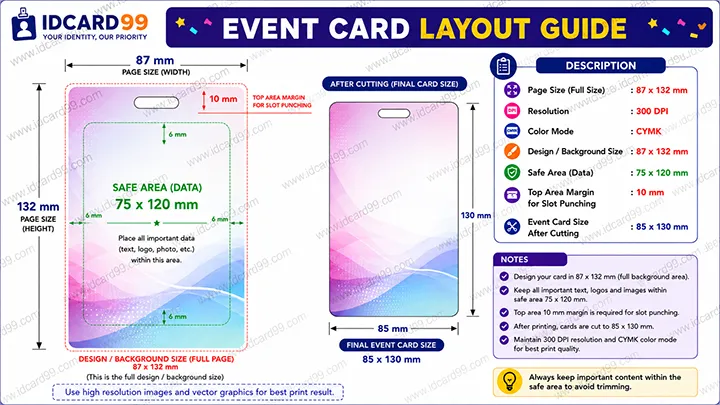
Event Card Layout
Learn event card printing dimensions, slot punching margin, printing area and professional vertical card design setup.
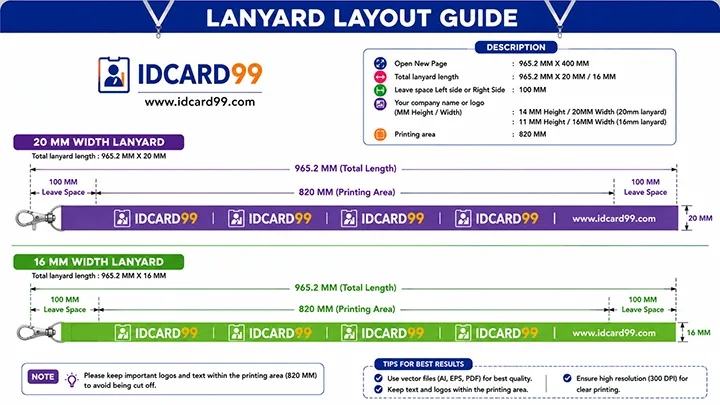
Lanyard Layout
Professional lanyard layout guide for 16mm and 20mm lanyard printing with repeat logo spacing and printable area setup.
Professional Print-Ready Card Design Setup
Creating a professional ID card design requires proper page dimensions, safe area management and correct DPI settings. Most printing issues happen because the design is created without bleed area or proper export settings.
Our layout guides are based on real printing industry experience and practical production workflow used for PVC card printing, event badge production and lanyard manufacturing.
These layout tutorials are useful for graphic designers, schools, offices, factories, event organizers and print shops looking to create high-quality print-ready files.
Common ID Card Design Mistakes
- Designing without bleed area
- Using low DPI images
- Keeping text too close to edges
- Wrong export resolution
- Incorrect lanyard repeat spacing
- Improper slot punching margin
- RGB and CMYK color mismatch
- Wrong card dimensions
Related Pages
Frequently Asked Questions
What is the best DPI for PVC card printing?
300 DPI is recommended for professional PVC card printing because it provides sharp text and high-quality print output.
Which software is best for ID card layout design?
CorelDRAW and Photoshop are widely used for professional ID card and lanyard design creation.
Why is bleed area important in printing?
Bleed area prevents white edges after cutting and helps maintain accurate print finishing.
What is safe area in ID card design?
Safe area is the inner section where important text and logos should be placed to avoid cutting during production.
Need Professional ID Card Printing?
We provide PVC card printing, RFID cards, event cards, lanyards and custom ID card solutions for schools, offices and businesses.
Contact Us